

Technical architecture
System boundaries, settlement services and API behaviour for architects and engineers implementing Quant Flow.
For the banking workflow and responsibilities, start with Platform architecture. This technical companion covers the system connections, settlement services and request examples.
Who this is for
Bank architects and systems integrators who need to place Quant Flow Platform in their estate. It covers the parties that call the platform, the capabilities behind the gateway, where the book of record sits, and the path of a token operation. It does not cover hosting. The platform runs either Quant-hosted or in your own infrastructure, with the same API in both. See Deployment model.
The parties
| Party | Calls the platform for | Authenticates as |
|---|---|---|
| Your bank systems (for example core banking or a payments hub) | Customer and account registration, token operations, balances, webhook registration | A machine client with a bearer token obtained with the OAuth 2.0 client-credentials grant from the deployment's identity provider. See Authentication. |
| Your people, through the Management Panel | Policies, the approvals queue, team members, roles and approval groups | Their own user account, with a bearer token from POST /api/auth/login |
| Your webhook endpoint | Receives signed events about operations, accounts, customers and approvals | Verifies the platform's signature on each delivery |
The Management Panel uses the same API documented here. Build client integrations against the published API Reference; do not depend on private Management Panel requests.
The book of record
Your core banking system remains the book of record for customer deposits. The platform records token contracts, customers, accounts and token operations, and reads balances from the token contract. It does not replace your ledger. Your bank decides when to issue (mint) or redeem (burn) tokens, based on deposits it has already booked, and reconciles the platform's outcomes against its own records.
In the standard workflow, your KYC/AML checks run in your own systems before they call the platform. A connector that calls your screening service from inside the platform, before an operation is signed, is not available today.
Your adapter must implement the core-banking connection. The public API contains no core-banking connector or coordinated cash-leg endpoint.
Quant Flow reference architecture
How bank applications reach Quant Flow, and how Quant Flow orchestrates tokenisation across DLT networks and existing bank infrastructure.
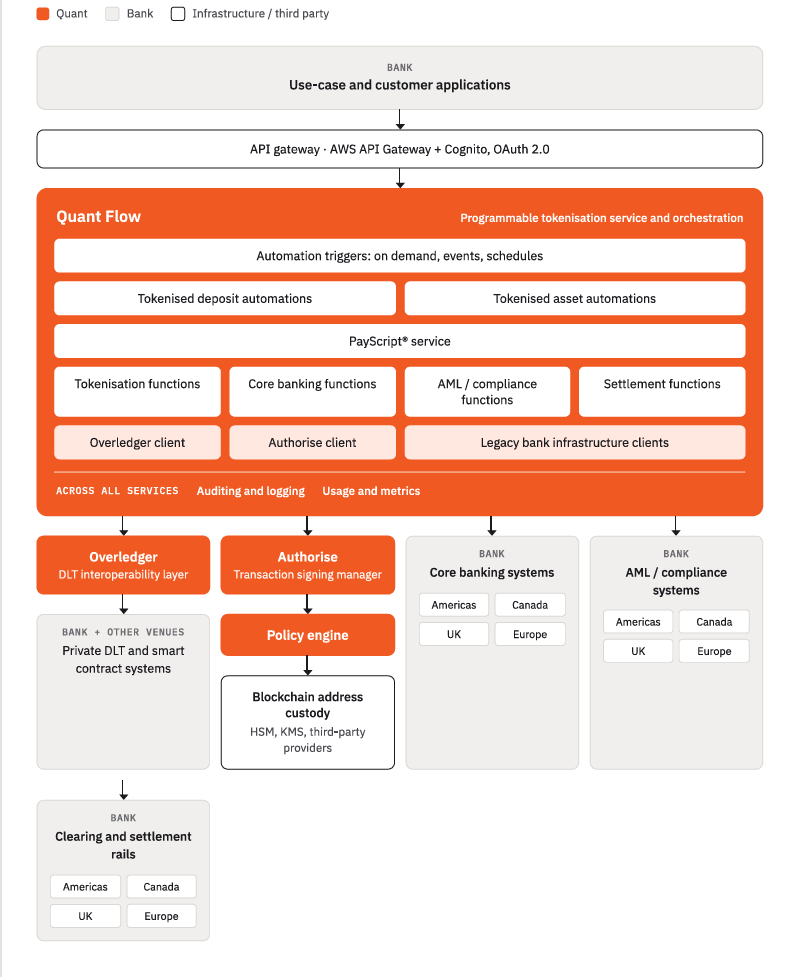
Integration boundaries
%%{init: {"theme": "neutral"}}%%
flowchart TB
    Core["Your core banking ledger"] --> Adapter["Your integration adapter"]
    Adapter --> Gateway["Quant Flow API gateway"]
    Panel["Management Panel / approvers"] --> Gateway
    Gateway --> Policy["Configured policy and approvals"]
    Policy --> Engine["Token settlement"]
    Engine --> Custody["External custody: signing keys"]
    Custody --> Engine
    Engine --> Network["Permissioned token network"]
    Network --> Engine
    Engine --> Events["Signed webhooks"]
    Events --> Adapter
    Adapter --> Core
Your adapter connects the cash ledger to token outcomes. Policy applies only when enabled; external custody retains the blockchain keys. Quant Flow does not post the cash leg.
Token operations · Policies · Webhooks
Capabilities behind the gateway
Requests go to your assigned gateway with the documented API-Version header. Protected operations carry a bearer token identifying the principal (sub) and organisation (tenant_id). Tenant-scoped operations enforce that organisation; shared catalogues and bootstrap authentication have their own access rules. The published host is https://api.qfp.quantnetwork.net; confirm your environment's host and deployed authentication controls during onboarding. See Authentication.
| Capability | API Reference tags | Responsibility |
|---|---|---|
| Identity and access | Auth, Users, Team members, Roles, Permissions, Approval groups | Sign-in, users, roles built from a permission catalogue, and named groups of approvers |
| Treasury (Token Engine) | Contracts, Customers, Accounts, Transactions, Balances | Registries of token contracts, customers and accounts. Accepts token operations and reports their state. Reads balances from the token contract. |
| Policy Engine | Policies, Templates, Approvals | Versioned policies that decide whether an operation may proceed, and the approval workflow for operations held for sign-off |
| PayScript | Scripts, Automations, Executions | Imported scripts, and automations that run them on demand or when a trigger fires |
| Notifications | Webhooks, Delivery history | Webhook destinations, signed delivery, delivery history and redelivery |
| Audit | Audit events | The organisation's activity log: search, read one event, export to CSV |
| Issuer views | Reserves, Dashboard | Reserve attestation and dashboard summaries. See Limitations for their current status. |
Settlement services behind the API
Some platform services do their work behind Treasury. Customers need to understand their responsibilities without connecting to their private interfaces.
| Service | Role in your integration | Customer connection |
|---|---|---|
| Gateway | Receives API requests and applies the deployment's access and version rules. | Your assigned API base URL, bearer identity and version header. |
| Identity | Provides user access, machine-client arrangements, roles, permissions and approval groups. | Authentication and Roles and access. |
| Treasury / Token Engine | Owns contracts, customer/account registries, token instructions and their lifecycle; reads on-chain balances. | Treasury integration. |
| Policy Engine | Evaluates configured controls and manages approval requests and tasks when enabled. | Policy, approvals and audit. Confirm enablement in the environment. |
| PayScript and its execution engine | Stores scripts and automation configuration, then runs supported actions through the platform. | Programmable payments. The action catalogue and run-outcome evidence need an agreed service-owner reference. |
| Authorise / custody integration | Provisions custody-backed account addresses and requests signatures from the configured provider. | Configure custody readiness during onboarding; use account and transaction reads. There is no customer Authorise HTTP API. |
| Overledger | Prepares transactions and broadcasts signed transactions to the configured network. | Submit through Treasury. Customers do not call its internal messaging interfaces. |
| Tracker | Observes registered ledger transactions and reports settlement outcomes to Treasury. | Read the Treasury transaction and receive business webhooks. Its internal lookup is not a customer API. |
| Token contracts and permissioned network | Execute the authorised token operation and hold token balances and locks. | Instruments and tokenised deposits, Supported networks. General contract administration requires the agreed operator process. |
| Notifications | Delivers signed business events, records attempts and supports eligible redelivery. | Notifications integration. |
| Audit | Records activity for investigation and governance. | Audit and evidence; settlement proof remains a separate transaction/ledger check. |
| Issuer reporting | Supplies dashboard and reserve views. | The operator dashboard. Current static figures cannot prove live reserves or settlement. |
%%{init: {"theme": "neutral"}}%%
flowchart TB
    Bank["Bank adapter and cash ledger"] --> Gateway["Gateway and Identity"]
    People["Bank operators and approvers"] --> Gateway
    Gateway --> Treasury["Treasury: contracts, accounts, token operations"]
    Gateway --> Scripts["PayScript and execution engine"]
    Scripts --> Treasury
    Treasury --> Policy["Policy and approvals when enabled"]
    Policy --> Treasury
    Treasury --> Prepare["Overledger: prepare"]
    Prepare --> Sign["Authorise and configured custody: sign"]
    Sign --> Broadcast["Overledger: broadcast"]
    Broadcast --> Chain["Token contracts on permissioned network"]
    Chain --> Tracker["Tracker: observe outcome"]
    Tracker --> Treasury
    Treasury --> Notify["Notifications: signed webhooks"]
    Notify --> Bank
    Gateway --> Audit["Audit and issuer reporting"]
The diagram explains responsibilities, not extra customer endpoints. The deployment determines custody mode, enabled controls and network connectivity. Bank cash postings remain in your own integration.
The path of a token operation
A token operation is one business instruction: mint, burn, transfer, lock, release or cancel. The API calls it a transaction. It is accepted first and settles later, without further calls from you.
| Step | What happens | What you see |
|---|---|---|
| 1. Submit | Your system sends POST /api/transactions. The platform checks the request is well formed and that the accounts and asset it names are usable. Balances are not checked at this point. | 202 Accepted, state POLICY_PENDING if judged by policy, otherwise BATCHED |
| 2. Policy check | The operation is checked against your organisation's policy. It is allowed, refused, or held for approval. | VALIDATED or AWAITING_APPROVAL when policy is enabled for the type. HELD is a separate insufficient-balance gate. A refusal ends in FAILED with failureCode: VALIDATION_REJECTED. |
| 3. Approval, if held | Approvers in the groups the policy names approve or reject the request. | approval.requested, approval.granted or approval.rejected webhooks. A rejection ends in FAILED with failureCode: APPROVAL_REJECTED. |
| 4. Settlement | The operation is batched, prepared, signed and submitted to the network. The platform holds no blockchain private keys. It prepares the transaction, the configured custody or HSM signing provider signs the transaction's digest, and the platform assembles and submits the signed transaction. See Security and key management. | BATCHED, PREPARED, SIGNED, SUBMITTED. txHash appears on submission. |
| 5. Outcome | The settling transaction is mined, or settlement fails. | CONFIRMED with blockNumber, or FAILED with a failureCode. A transaction.confirmed or transaction.failed webhook. |
CONFIRMED, FAILED and CANCELLED are terminal. Balances reflect an operation only once it settles. Operations and their lifecycle gives every state and failure code.
Operations settle on a private, permissioned, EVM-compatible network with immediate, deterministic finality: once a block is finalised it is not reversed. See Supported networks.
Policy is disabled in the shipped settlement configuration. When enabled, the default judged types are MINT, BURN, TRANSFER and LOCK. Confirm the environment's policy configuration and approval controls before go-live; the sample below illustrates the policy-enabled path.
Separation of duties
The design separates the party that proposes a money movement from the people who approve it. Bank systems submit operations. Policies decide which operations need approval. Approvers act through the approvals API with their own user token, and each approval action is recorded. Roles are built from a permission catalogue, so you can give a machine client token-operation permissions without approval permissions. See Policy, approvals and audit and Identities and entitlements.
Worked example
A mint submission, an intermediate read and a failed settlement response. The sample follows the policy-enabled path; it is illustrative contract data, not a live test result.
Submit:
POST /api/transactions HTTP/1.1
Host: api.qfp.quantnetwork.net
Authorization: Bearer <access token>
API-Version: 1.0.0
Content-Type: application/json
Idempotency-Key: 3f7c1a90-5d2e-4b08-9a41-6c2b8e5d7f13

{
  "txType": "MINT",
  "assetId": "GBP",
  "accountRef": "ACC-0001",
  "amount": "10.50"
}
Accepted:
HTTP/1.1 202 Accepted
Content-Type: application/json

{
  "transactionId": "3f7c1a90-5d2e-4b08-9a41-6c2b8e5d7f13",
  "txType": "MINT",
  "assetId": "GBP",
  "accountRef": "ACC-0001",
  "customerRef": "CUST-0001",
  "counterpartyRef": null,
  "amount": "10.50",
  "params": {},
  "state": "POLICY_PENDING",
  "createdAt": "2026-08-06T09:29:10.285Z",
  "updatedAt": "2026-08-06T09:29:10.285Z"
}
Read back while in flight with GET /api/transactions/{transactionId}:
{
  "transactionId": "3f7c1a90-5d2e-4b08-9a41-6c2b8e5d7f13",
  "txType": "MINT",
  "assetId": "GBP",
  "accountRef": "ACC-0001",
  "customerRef": "CUST-0001",
  "counterpartyRef": null,
  "amount": "10.50",
  "params": {},
  "state": "VALIDATED",
  "createdAt": "2026-08-06T09:29:10.285Z",
  "updatedAt": "2026-08-06T09:29:12.041Z"
}
A failed settlement carries the classification in failureCode and the specific reason in reasonCode:
{
  "transactionId": "3f7c1a90-5d2e-4b08-9a41-6c2b8e5d7f13",
  "txType": "MINT",
  "assetId": "GBP",
  "accountRef": "ACC-0001",
  "customerRef": "CUST-0001",
  "counterpartyRef": null,
  "amount": "10.50",
  "params": {},
  "state": "FAILED",
  "failureCode": "CHAIN_FAILED",
  "reasonCode": "EXECUTION_REVERTED",
  "txHash": "0x4a1b8c7d2e5f309a6b1c4d7e8f0a2b3c5d6e7f8091a2b3c4d5e6f7089a1b2c3d",
  "blockNumber": 18446801,
  "createdAt": "2026-08-06T09:29:10.285Z",
  "updatedAt": "2026-08-06T09:33:12.550Z"
}
View in API Reference
- Submit a token operation ·
POST- Get one token operation ·
GET
Errors and edge cases
- Accepted is not settled. A
202fromPOST /api/transactionsconfirms acceptance only. Do not post to your ledger on a202. Wait forCONFIRMED. - Balances are not checked at submission. An operation for more than the account holds is accepted and then fails during settlement.
- An operation can wait for approval until the request expires. Each policy can set a time-to-live for its approval requests, in hours, days, weeks, months or years. When it elapses, the request and its pending tasks move to
EXPIRED. A request from a policy with no time-to-live staysPENDINGuntil someone acts on it. - An asset needs an
ACTIVEcontract before accounts can be registered or operations raised against it. A missing contract is a404when registering an account and a400when submitting an operation. - Accounts are provisioned asynchronously.
POST /api/accountsreturns202with the accountPENDING. The wallet address appears when provisioning completes.
API Reference
Open an endpoint for request fields, response examples and the interactive API console.
| Operation | Method |
|---|---|
| Submit a token operation | POST |
| Get one token operation | GET |
| Register an account | POST |
| Deploy the token contract for an asset | POST |
| Sign in | POST |
Related pages
Updated 2 days ago